
Public Notice on Preventing Unauthorized Addition to WhatsApp Groups
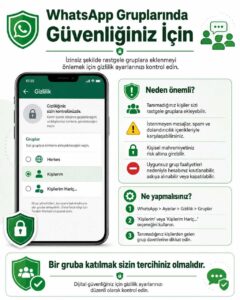
PUBLIC NOTICE
How Can You Prevent Being Added to WhatsApp Groups Without Your Consent?
In recent times, users being added to various WhatsApp groups without their knowledge and consent can expose them to unwanted messages, misleading content, fraud attempts, and various risks to their personal privacy. Being in groups where activities such as spam, fraud, sharing of harmful content, or actions that violate WhatsApp's terms of use are carried out may create additional risks for users. When WhatsApp detects activities that violate its terms of use, it may suspend the activities of the relevant groups and impose sanctions such as restriction, suspension, or closure on accounts associated with the violation. For this reason, it is highly important for users to enable privacy settings that prevent them from being added to random groups without their knowledge and consent.
WhatsApp offers a group privacy setting that allows users to determine who can add them to groups. By using this setting, you can restrict people you do not know or users you have not authorized from adding you directly to WhatsApp groups.
How to Configure the Setting?
Follow the steps below in the WhatsApp application:
WhatsApp → Settings → Privacy → Groups
In this section, one of the following options can be selected:
Everyone: Any WhatsApp user can add you directly to a group.
Kişilerim Hariç…: Telefon rehberinizde kayıtlı kişiler arasından sizi doğrudan gruplara eklemesine izin vermediğiniz kişileri belirleyebilirsiniz.
My Contacts Except…: You can specify which people among those saved in your phone's contact list are not allowed to add you directly to groups.
Our Recommendation: Check Your Privacy Settings Against Unauthorized Group Additions
To prevent being added to random WhatsApp groups by people you do not know, it is recommended to use at least the "My Contacts" option.
Users who want a higher level of control can use the "My Contacts Except…" option to specify in more detail who can add them directly to groups.
A group administrator who is not authorized to add you directly to a group due to your privacy settings can send you a group invitation via private message instead of adding you directly to the group. This way, the decision of whether or not to join the group is yours.
Remember! Joining a WhatsApp group should be your choice.
To protect your personal privacy and reduce unwanted messages and potential fraud attempts, it is strongly recommended that you regularly check your WhatsApp privacy settings and limit who can add you to groups.
For your digital security, check your privacy settings and be cautious of people you do not know and suspicious group invitations.